
Virtual staging is the process of using software to digitally add furniture, décor, and lighting to real estate listing photos, turning empty or cluttered rooms into polished, move-in-ready spaces without any physical furniture. In 2026, AI-powered virtual staging tools have made this process faster, cheaper, and more accessible than ever for real estate agents. Instead of spending thousands on traditional staging logistics, agents can upload a photo of a vacant room and receive a fully furnished image in minutes. This approach helps buyers visualize a property’s potential before they ever walk through the door, and it gives agents a serious edge in listing presentations and lead conversion.
Find It Fast
Key takeaways
- Virtual staging uses digital tools to furnish listing photos, replacing physical staging at a fraction of the cost.
- Physical staging typically runs $1,500 to $5,000 or more for the first month, while AI virtual staging costs as little as $12 to $39 per image depending on the platform (Virtual Staging AI, 2026).
- In 2026, AI tools like Virtual Staging AI, Stager AI, Collov AI, ApplyDesign, and Staging Wizard let agents generate staged images in minutes without hiring a third party.
- Staging the living room matters most to buyers (37%), followed by the primary bedroom (34%) and the kitchen (23%), according to the National Association of Realtors.
- Virtual staging works best when the furniture style matches the home’s architectural character and rooms are clean and depersonalized before photography.
- Virtually staged photos perform strongest when displayed on a dedicated single-property website built for lead capture.
What is virtual home staging?
Virtual home staging uses software to digitally place furniture, artwork, rugs, lighting, and décor into listing photos. Empty rooms, cluttered spaces, and new-construction homes can be made to show exactly how a space might look when furnished. This makes layouts and room functionality far easier for buyers to understand, especially when they are scrolling through listings online and making snap judgments about which homes to tour.
How does virtual staging work?
The workflow is straightforward. An agent or photographer captures high-quality photos of the property. Those images are uploaded to a virtual staging platform, where AI analyzes the room’s dimensions, lighting, and architectural features. The software then generates a furnished version of the room based on the style the agent selects. Most tools produce results in under five minutes per image, and agents can regenerate or adjust the output until the staging looks right.
Virtual staging vs. physical staging
Physical staging requires renting furniture, scheduling delivery and pickup, and coordinating with a staging company. That process typically costs $1,500 to $5,000 or more for the first month once logistics, labor, and rental fees are included (HomeAdvisor, 2026). Virtual staging replaces all of that with a per-image cost that ranges from roughly $12 to $39 depending on the platform and plan. The table below breaks down the key differences.
| Factor | Physical staging | Virtual staging |
| Cost per listing | $1,500 to $5,000+ | $12 to $39 per image |
| Turnaround time | Days to weeks | Minutes to hours |
| Style flexibility | One look per staging period | Multiple styles per photo |
| On-site coordination | Required (delivery, setup, removal) | None |
| Best for | High-end listings with open house traffic | Any listing, especially vacant or remote |
Virtual staging does not replace physical staging in every scenario. For high-traffic open houses where buyers will walk through the property, physical furniture still creates a stronger in-person impression. But for online marketing, where the vast majority of buyer interest begins, virtual staging delivers comparable visual impact at a fraction of the cost and time.
What are the benefits of virtual staging in 2026?
Virtual staging gives agents three distinct advantages when marketing a listing: speed, cost savings, and creative flexibility. Here is how each one plays out in practice.
Speeds up listing creation
Virtual staging happens after photography and does not require any on-site work. Once photos are available, staging can be completed without waiting on furniture delivery, setup, or removal. That means an agent can photograph a vacant home in the morning and have fully staged listing images ready to upload to the Multiple Listing Service (MLS) by the afternoon.
Saves money
The cost difference between physical and virtual staging is significant. Where traditional staging runs $1,500 to $5,000 or more for a single listing, virtual staging tools charge a fraction of that per image. For agents managing multiple listings at once, the savings compound quickly. Those freed-up dollars can be redirected toward paid advertising, video production, or other marketing that drives buyer attention.
Provides creative flexibility
A physically staged home can only be shown one way at a time. Virtual staging allows agents to quickly swap furniture styles, color palettes, and décor to find the look that best suits each room and appeals to the target buyer demographic. Want to show the same living room in a modern style and a mid-century style? Virtual staging makes that possible in minutes, not weeks.
That seller expectation is exactly why virtual staging matters. When you walk into a listing appointment with a portfolio of beautifully staged images, you are showing the seller how their home will look to buyers online. That visual proof builds trust and wins listings.
Best AI virtual staging tools for real estate agents in 2026
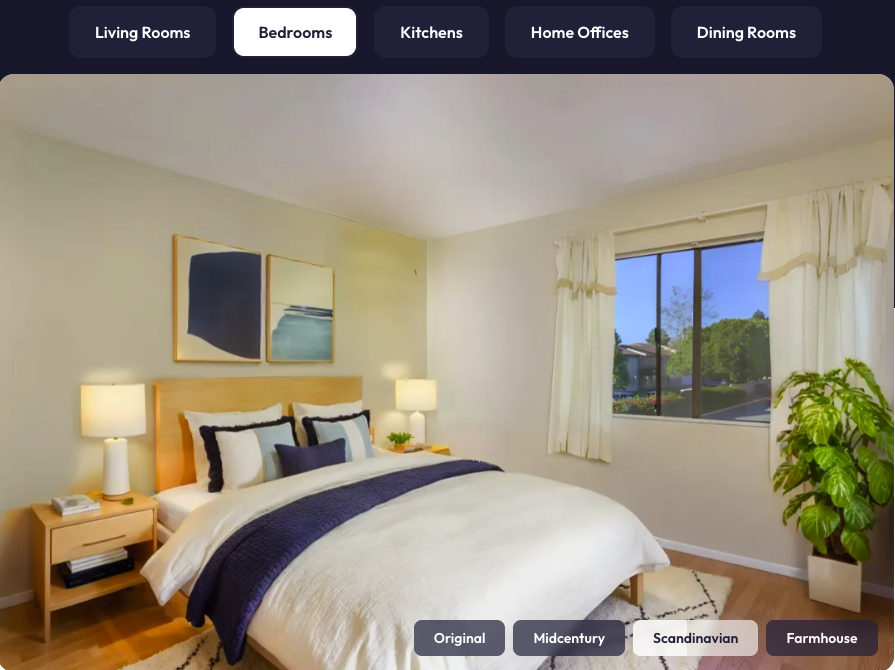
As of 2026, several AI-powered platforms let agents upload a listing photo and generate a staged room in minutes. These tools are designed for agents who want speed, control, and a more affordable alternative to hiring a staging company. Below are five of the most widely used options, along with their pricing models and standout features.
Each tool on this list uses AI to analyze room geometry, lighting, and architecture before placing furniture, which is why the results in 2026 look dramatically more realistic than what was possible even two years ago.
Virtual Staging AI
Developed out of the Harvard Innovation Lab, Virtual Staging AI focuses on fast, MLS-ready images with a clean, realistic look. It supports furniture removal and a wide range of room types, making it practical for everyday listings. Pricing is subscription-based with monthly image allowances that scale by plan, starting at roughly $12 per image on higher-volume tiers. This positions it well for agents who stage listings regularly and want predictable costs.
Stager AI
Stager AI positions itself as an all-in-one virtual staging and photo editing tool that works across desktop and mobile. Beyond staging rooms, agents can add objects, adjust lighting, and make quick visual corrections in one workflow. It uses a credits-based subscription model with multiple plan tiers, allowing agents to choose a level that matches their staging volume. Plans start at around $15 per month for a limited number of credits.
Collov AI
Collov AI leans more heavily into interior design and visual styling, appealing to agents who care about aesthetics and layout variety. It offers flexible pricing options, including pay-per-render credits, that work well for agents who only need to stage a handful of photos at a time. This makes it a strong choice for occasional use without committing to a recurring subscription.
ApplyDesign
ApplyDesign offers both one-click auto staging and a hands-on DIY editor for agents who want greater control over furniture placement and room layout. It uses a credit-based system so users pay per staged image, with per-image costs varying based on the number of credits purchased. The DIY editor is a differentiator for agents who want to fine-tune exactly where each piece of furniture sits.
Staging Wizard
Staging Wizard is a budget-friendly tool that combines virtual staging with short motion and video-style features. It offers a free trial so agents can experiment with both still images and animated content before upgrading. Paid plans are tiered by image volume, making it accessible for agents who want to keep costs low while testing staging and video in their listing marketing.
The right tool depends on your staging volume, budget, and how much control you want over the final image. Agents who list frequently will get the most value from subscription plans with monthly allowances, while agents who list a few homes per quarter may prefer pay-per-image credit systems.
How to virtually stage for specific home styles
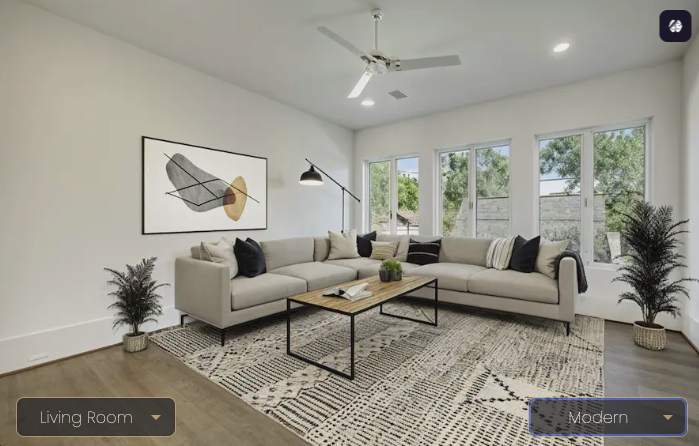
Virtual staging works best when the furniture and décor match the home’s architectural character. When buyers instantly recognize a style that feels right for the house, the images feel more realistic and easier to trust. To get there, choose the closest style preset in your virtual staging tool and add short prompts that reference the home’s architecture. Then regenerate results until the furniture, layout, and details feel natural for the space.
Modern
Use sleek furniture with clean lines, neutral color palettes (whites, grays, matte blacks), and minimal décor to create a sharp, uncluttered look. Think a low-profile sectional in light gray, a glass-top coffee table, and a single piece of abstract wall art. Pieces with metal, glass, or smooth finishes reinforce a contemporary feel without distracting from the architecture. This style benefits from open layouts and strong negative space, which makes rooms feel larger and more refined.
Example AI prompt: “Modern living room, low-profile light gray sectional, glass coffee table, abstract wall art, neutral palette, minimal décor, open layout.”
Cape Cod
Choose simple, comfortable furniture with clean lines and light fabrics that reflect the home’s relaxed, welcoming character. A slipcovered sofa in white or soft blue, a weathered wood coffee table, and woven jute rugs work well. Add subtle nautical touches like soft blues or woven textures, but keep them restrained so the room does not feel themed. Stick to a palette of whites, creams, soft blues, and sandy neutrals.
Example AI prompt: “Cape Cod living room, white slipcovered sofa, weathered wood coffee table, jute rug, soft blue accents, coastal but not themed.”
Victorian
Select furniture with curved silhouettes, rich fabrics like velvet or brocade, and traditional details that complement Victorian architecture. A tufted settee in deep burgundy or navy, a carved wood side table, and framed botanical prints create the right tone. Use symmetry in placement and classic accents like decorative lighting to elevate the space without overwhelming it. Color palettes should lean toward deep jewel tones, warm golds, and dark wood finishes.
Example AI prompt: “Victorian parlor, tufted navy settee, carved wood side table, framed botanical prints, jewel-tone palette, symmetrical layout.”
Colonial
Stick to balanced, timeless furniture with warm wood tones and neutral upholstery. A wingback chair in cream linen, a cherry wood writing desk, and brass table lamps anchor the room in the Colonial tradition. Incorporate traditional décor such as simple lamps, understated artwork, and structured layouts to reinforce symmetry. Warm whites, navy, and rich wood tones form the core palette.
Example AI prompt: “Colonial dining room, cherry wood table, cream upholstered chairs, brass chandelier, warm white walls, symmetrical layout.”
American Craftsman
Furnish with solid, wood-forward pieces that emphasize craftsmanship and clean geometry. A mission-style oak dining table, leather club chairs, and handmade ceramic vases match the home’s handmade character. Use earthy tones (olive, rust, warm brown), simple patterns, and functional décor. The Craftsman style rewards restraint, so avoid anything overly ornate.
Example AI prompt: “Craftsman living room, mission-style oak furniture, leather club chair, earthy tones, handmade ceramic accents, clean geometry.”
Prairie
Use low-profile furniture and horizontal lines that echo the Prairie style’s emphasis on openness and connection to the landscape. A long, low sofa in warm tan, a horizontal wood console, and stained glass accent pieces work well. Warm neutrals, natural materials, and restrained décor help maintain visual flow. Avoid tall, vertical furniture that fights the home’s horizontal proportions.
Example AI prompt: “Prairie-style living room, low-profile tan sofa, horizontal wood console, warm neutrals, stained glass accent, open layout.”
Ranch
Choose casual, approachable furniture with comfortable shapes that suit the easy, single-story nature of ranch-style homes. A deep-cushion sofa in warm beige, a round wood coffee table, and simple table lamps keep the room grounded. Keep décor simple and layouts open to make rectangular or smaller rooms feel functional and spacious. Earth tones, warm woods, and soft textiles form the right palette.
Example AI prompt: “Ranch living room, deep-cushion beige sofa, round wood coffee table, earth tones, simple décor, open and functional layout.”
Matching the staging style to the home’s architecture is the single biggest factor in whether virtually staged images feel believable or artificial. When in doubt, err on the side of simplicity and let the home’s bones do the talking.
Expert website design services
Every day, Luxury Presence creates and manages real estate websites for some of the biggest agents, teams, and brokerages in the country. Learn how we can transform your online presence.

How to prepare a home for virtual staging
Virtual staging works best when rooms are clean and clear before photography begins. A little preparation before the shoot helps AI produce more realistic results and makes the final images feel polished. Follow these five steps to get the best output from any virtual staging tool.
Step 1: Photograph the rooms buyers focus on
Prioritize photographing the living room, primary bedroom, kitchen, and dining area first, since these rooms have the biggest impact on buyer decisions. According to a 2023 NAR report, staging the living room is most important for buyers at 37%. The primary bedroom follows at 34%, and the kitchen comes in at 23% (National Association of Realtors, 2023). Focusing on these spaces first ensures your virtual staging effort is applied where it matters most.
Step 2: Clear and depersonalize high-impact rooms
Coach sellers to remove clutter, family photos, and bold personal items from the main living area, primary bedroom, dining space, and kitchen before photos are taken. A neutral, simplified space gives AI virtual staging tools a cleaner canvas to work with, which produces more accurate and realistic results. The fewer distractions in the base photo, the better the AI output.
Step 3: Do a quick cleanup and simple touch-ups
Walk sellers through basic cleaning and easy fixes before the shoot: wipe surfaces, vacuum floors, make beds hotel-neat, straighten curtains, and hide cords. These small details prevent distractions in the base photo that AI tools may not be able to remove cleanly.
Step 4: Keep staging style consistent across rooms
Choose a virtual staging style that fits the home’s price point and architecture, then apply it consistently across the living room, primary bedroom, dining area, and kitchen. Consistency helps the photos feel like a cohesive story rather than a mix of unrelated rooms. If you staged the living room in a modern style, do not switch to farmhouse for the bedroom.
Step 5: Review and refine staged images
Review the virtually staged images to confirm that furniture placement, décor, and layout clearly communicate how each room functions. Check for common AI artifacts like floating furniture legs, mismatched shadows, or objects that clip through walls. Regenerate any image that does not pass a quick visual quality check before uploading it to the MLS or your listing website.
Preparation is the difference between virtual staging that looks convincing and staging that looks like a filter. Invest 30 minutes of seller coaching before the photo shoot, and the AI tools will do the rest.
Making Virtual Staging Work for Every Listing
Virtual staging gives agents a fast, affordable way to present vacant or cluttered homes in their best light, especially when the goal is to capture attention online. When you pair the right tool with a style that fits the home and prepare the space well before photography, the results feel polished, realistic, and more persuasive to buyers. For many listings in 2026, that combination is enough to make virtual staging one of the most effective marketing tools available.
FAQs
Let’s chat
Choosing your website provider is a big decision, and you probably have questions.
About the author

Marketing Manager
Kate Evans is a content marketing strategist at Luxury Presence, the leading growth platform for high-performing real estate professionals. She develops data-driven editorial content and supports SEO strategy and brand voice frameworks that help agents attract qualified leads and establish market authority. Her published work covers topics including CRM strategy, social media marketing, and digital growth, supporting thousands of agents in scaling their businesses through modern marketing.