Google Search Console has given SEO teams first-party data from Google for years. ChatGPT never offered anything like it.
On November 10, 2026, OpenAI launched Businesses in ChatGPT in beta, and I've been working through the details ever since. OpenAI says 1.2 billion people use ChatGPT each week, so the details matter.
Here is what it is, what you'll see once you're in, and what to do this week.
What Businesses in ChatGPT is
Business Hub is where you claim your business in ChatGPT, manage the information ChatGPT has about it, and see how people engage with it. Think of the hub as Search Console for ChatGPT. It shows how your business appears in ChatGPT answers and how much traffic ChatGPT sends to your website.
Once you're verified, you can update your website, business description, category, logo, and delivery and return policies. OpenAI reviews and publishes those changes, and ChatGPT may also draw on other sources when it answers questions about your business.
Claimed businesses in eligible categories can also create a business agent that answers customer questions inside ChatGPT. OpenAI currently offers business agents to eligible ecommerce and online service businesses in the US, so check the eligibility requirements before you plan around one.
For my GEO and AEO work, this is a big win. It's the first time we've had first-party data straight from OpenAI.
What the Business Hub shows real estate agents
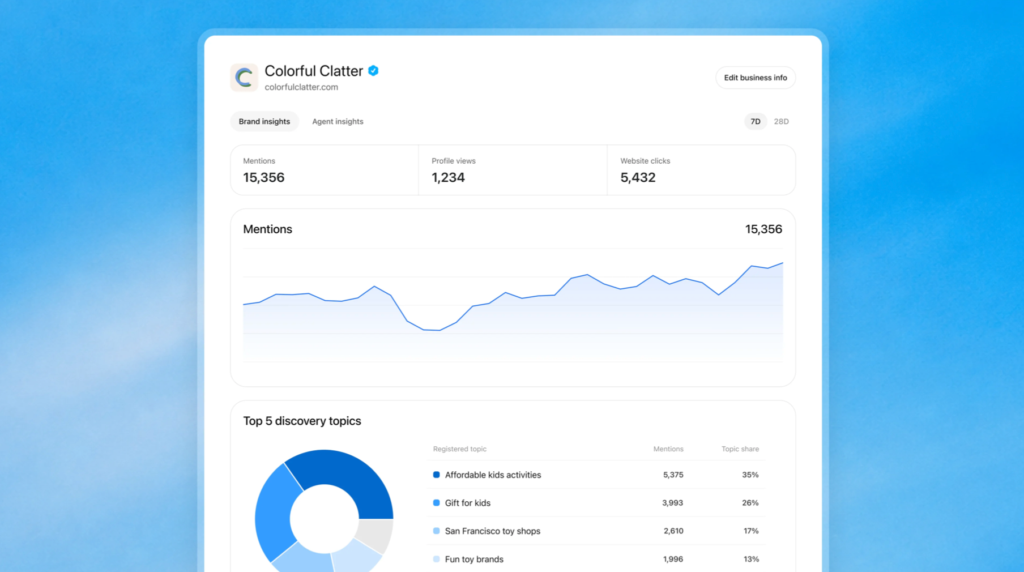
After your claim and identity verification are approved, the hub shows aggregate activity over the past 28 days.
- Mentions. For a local business, a mention counts when ChatGPT shows a result for that location, even if nobody opens the listing or visits your website. For an online business, a mention counts when ChatGPT references your website, and a brand name on its own doesn't count. Most real estate agents will likely fit the local definition.
- Website clicks. How many times people clicked through to your site from ChatGPT. The hub's own tooltip, as Search Engine Roundtable reported, says clicks don't confirm website visits or conversions, so skip the side-by-side with your GA4 sessions.
- Discovery topics. The hub shows your top five common themes in ChatGPT answers that mentioned or cited your business. They're aggregate categories, so you won't see individual prompts, and they don't directly measure what a customer wanted.
OpenAI designed the reporting to protect user privacy. It doesn't share users' conversations with businesses, and metrics only appear once enough activity clears a reporting threshold.
A blank metric can mean activity hasn't reached that threshold, data is still being collected, or reporting is unavailable. It doesn't necessarily mean zero.
If a metric stays blank, contact OpenAI Support.
What the hub can't show yet
Set your expectations early, because I know you’ll wish it had some of these.
- Prompt data. OpenAI doesn't share individual prompts or conversations, so you can't see what people actually asked.
- Competitor benchmarks. No share of voice or rankings, so you can't compare yourself to the agent down the street.
- Audience segments. There's no breakdown of who is asking.
- Lead or revenue attribution. Clicks are the closest signal you'll get.
- API or bulk export. The data lives in the hub for now.
This is a beta, so expect the list to change. OpenAI says it plans to expand Businesses in ChatGPT to more markets and business categories over time.
How to claim your business
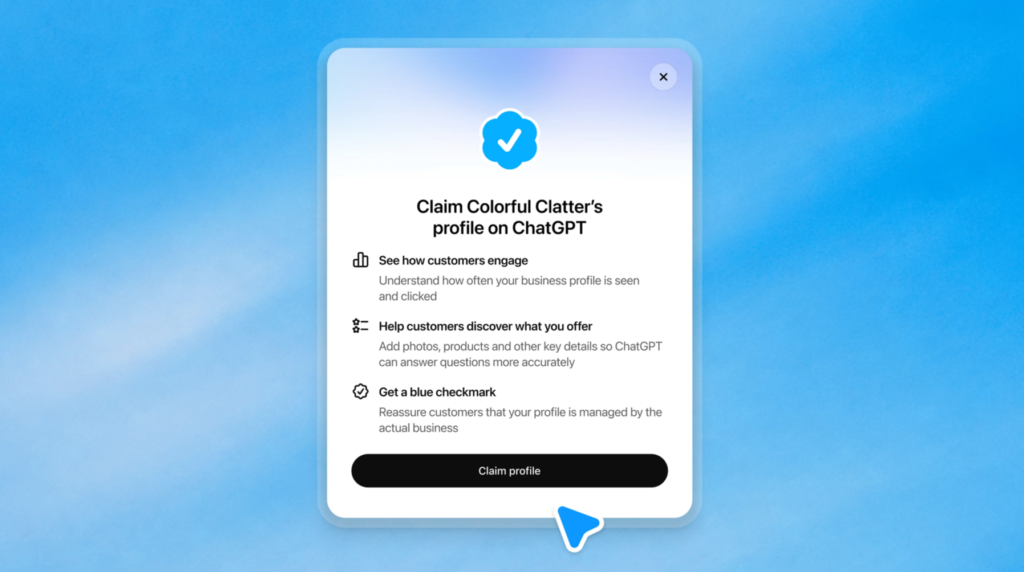
You can claim a business if you own it or you're authorized to represent it. These steps follow OpenAI's setup guide.
- Sign in to ChatGPT, open Business Hub from the sidebar, and search for your business by name.
- Select the listing that matches your business and confirm the ChatGPT account you'll use to manage it.
- Verify your connection to the business using one of the methods below.
- Wait for OpenAI to review your claim. It emails its decision or asks for more information, and approval isn't guaranteed.
- Complete identity verification through Persona.
If you can't find your business, OpenAI says local businesses can currently claim only an existing US listing.
If your listing shows Contact support, it's locked and OpenAI Support can help with access.
Verification options
- Business phone. OpenAI sends a code by text or automated call to the number shown.
- Business email. OpenAI sends a code to the email address associated with your business.
- Website domain. You add a DNS TXT record from ChatGPT to your domain. Copy the type, name or host, and value exactly, and expect DNS changes to take time to appear. If you're a Luxury Presence client, send this one to our Support team and we'll add the record for you.
Be patient after you verify. Barry Schwartz at Search Engine Roundtable verified through DNS and saw no data at first.
Persona identity verification
Claim approval isn't the last step. Until Persona verification is approved, you can't publish changes, connect a product feed, view your reporting, or create an agent. Persona may ask for a government-issued ID, business registration information, and proof that you're authorized to represent the business.
Make sure the business name, address, and any registration or tax number match your official business records.
Approval earns the blue verified check. If you start with another verification method, you can finish Persona later from your business overview. Submitting your information to Persona doesn't mean you're approved, so wait for OpenAI's email. Have everything ready before you start and finish the same day.
One more caution. If you create a new profile through Persona, OpenAI's approval publishes it automatically, and OpenAI Support can't unpublish or hide a published profile. Continue only when you're ready.
Real estate teams, agencies, and multiple locations
The admin who claimed your business can add teammates in Business Hub and give an agency access, and each person uses their own ChatGPT account. Don't forward a personal claim invitation.
Each distinct brand is managed separately, and claiming a main brand doesn't claim its locations.
What claiming does for you
Claiming lets you manage the information you provide about your business. OpenAI says it doesn't guarantee increased visibility or give you control over ChatGPT's independent recommendations.
Treat it as the way to get accurate details in front of ChatGPT and first-party data back to you.
What we're still working out
I'd rather tell you what we don't know than guess. OpenAI documents access for teammates and agencies. I'm still confirming the exact setup we'll use to work with our Luxury Presence hubs, including which email to share access with.
We're also working out what our reporting will look like, how business agents will work for you, and how OpenAI will change the beta as it goes.
The direction, however, is clear. We want to turn your discovery topics into a content roadmap, explain the data in plain language, and make claiming your business part of onboarding.
What to do this week
Claim your business, finish Persona right away, and check back in a few weeks. The 28-day window needs time to fill, and the first numbers will tell you more than any prediction I could make today.
If your listing doesn't appear or a metric stays blank, contact OpenAI Support with the step you were on, any error message, and a screenshot with sensitive information removed.
Ready to grow?
Turn your content into your best lead source
See how Luxury Presence helps agents turn website visits into closed deals