
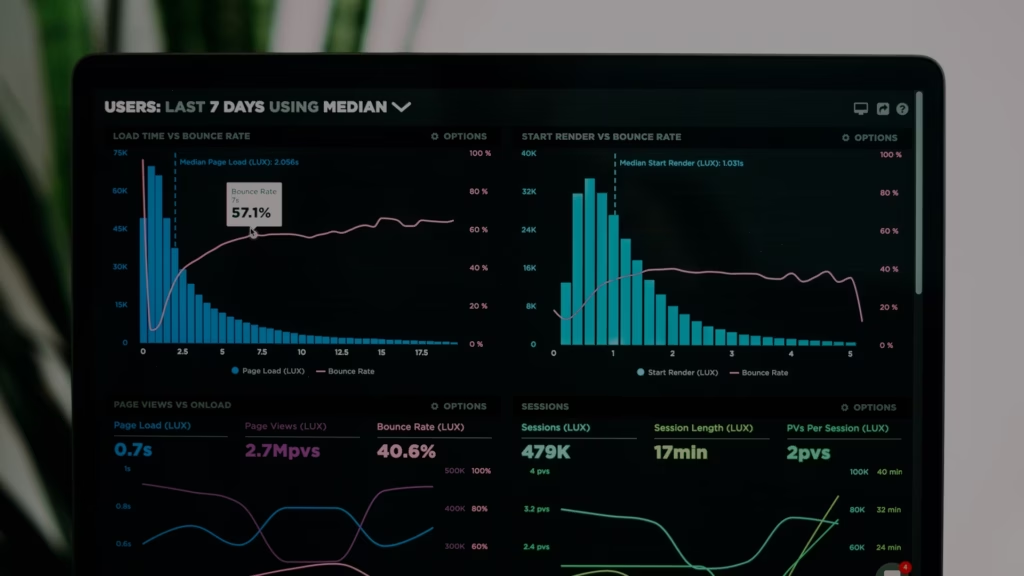
Website analytics for real estate agents is the practice of measuring how visitors find, browse, and act on your real estate website. In 2026, when the vast majority of homebuyers begin their search on the internet (National Association of Realtors, 2024), your site is often the very first impression a future client has of your business. The agents who track their website data make smarter marketing decisions, spend less per lead, and close more transactions. The agents who don't are guessing. This guide breaks down every metric you need to watch, the tools that make tracking simple, and a step-by-step process for turning raw numbers into listings and closings.
Key takeaways
- Website analytics connects marketing spend to real results. Every dollar you put into ads, SEO, or social media should be traceable back to site visits, form fills, and booked appointments.
- Eight metrics matter most. Page views, sessions, traffic sources, bounce rate, session duration, new vs. returning visitors, click-through rate, and conversion rate give you a clear picture of site health.
- Google Analytics 4 (GA4) is the standard platform in 2026. Universal Analytics was deprecated in July 2023. If you have not migrated, you are flying blind.
- Benchmarks turn data into decisions. Knowing your numbers is only useful when you can compare them to industry averages and your own month-over-month trends.
- A weekly review habit is worth more than a monthly deep dive. Fifteen minutes each Monday morning spent checking traffic sources and conversion events will keep your marketing on track.
Why website analytics matter for real estate agents in 2026
Your website is not a digital brochure. It is a lead-generation system, and every system needs a dashboard. When you track website analytics, you gain the ability to see exactly what is working, what is wasting money, and where your next client is most likely to come from. Here is what analytics data allows you to do.
- Spot performance problems before they cost you leads. Data on page load speed, mobile responsiveness, and navigation errors tells you whether visitors are having a smooth experience. Google's Core Web Vitals framework sets measurable thresholds for load speed, interactivity, and visual stability that directly affect both user experience and search rankings (Google Web Vitals, 2026).
- Understand who is visiting and what they do. Analytics show you visitor demographics, location, and interests. These details help you shape your business plan around the audience that actually shows up.
- See which pages hold attention and which lose it. Metrics like page views, session duration, and bounce rate reveal how users interact with your content. A listing page with a 15-second average session duration is telling you something different than one with a 3-minute average.
- Measure which marketing channels bring real leads. Traffic sources show you whether visitors arrived from organic search, paid ads, social media, email, or a direct URL entry. This is the data that tells you where to spend more and where to cut.
- Track form fills, calls, and booked appointments. Conversion tracking ties a visitor's journey to a specific action. Without it, you cannot calculate the return on any marketing investment.
- Benchmark against competitors. Comparing your traffic volume, keyword rankings, and engagement metrics to other agents in your market reveals gaps and opportunities you would otherwise miss.
- Improve your SEO and content strategy. Tracking which keywords bring visitors to your site, and which blog posts earn the most engagement, guides every piece of content you create going forward.
"Because you're sending people to your site, not a third-party portal, you create the opportunity to turn any traffic into exclusive leads."
— Tracy Tutor, Real Estate Agent and Author
That quote captures the core argument for investing in your own website analytics. When traffic goes to a third-party portal, you share leads with every other agent on the platform. When traffic goes to your site, every visitor is yours to convert. Analytics is how you measure whether that conversion is actually happening.
How to set goals before you track anything
Data without a goal is just noise. Before you open any analytics dashboard, define what you want your website to accomplish. Then build your tracking around those objectives.
Conduct a quick website audit
Open your site on both a desktop and a phone. Click through your top five pages. Note anything that loads slowly, looks broken, or makes it hard to contact you. This five-minute exercise gives you a baseline understanding of your site's current state.
Set SMART analytics goals
SMART stands for Specific, Measurable, Attainable, Relevant, and Time-bound. Here is a simple checklist for setting your first round of website goals.
- Audit your current design and page load speed on both desktop and mobile.
- Review your existing traffic sources inside GA4 to see where visitors come from right now.
- Identify your top three conversion actions. These might be contact form submissions, property inquiry clicks, or phone calls.
- Set numeric targets for each conversion action. For example: "Increase contact form submissions from 12 per month to 20 per month within 90 days."
- Document your baseline metrics before making any changes so you can measure the impact of every adjustment.
These goals become the filter for every analytics report you pull. If a metric does not connect to one of your goals, you can safely ignore it for now.
The eight website metrics every agent should measure
The data you track should map directly to your business goals. Below are the eight metrics that matter most for real estate websites, defined in plain English with context on what "good" looks like.
Page views
A page view is counted every time a page loads in a visitor's browser. If one person views your "About" page and three listing pages, that counts as four page views. This metric tells you which pages attract the most attention. High page views on a neighborhood guide suggest strong local interest. Low page views on a new listing page may mean the page is hard to find or poorly promoted.
Sessions
A session is a group of interactions one visitor has with your site during a single visit. A session can include multiple page views, button clicks, and form submissions. It starts when a visitor arrives and ends after 30 minutes of inactivity or when the visitor leaves. Sessions help you understand how people move through your site and how many total visits your site receives over a given period.
Traffic sources
A traffic source is the channel that brought a visitor to your site. Understanding where your visitors come from is one of the most valuable things analytics can tell you. The main categories are:
- Organic search: Visitors who found you through a search engine results page.
- Paid search: Visitors who clicked on a search engine ad.
- Direct: Visitors who typed your URL into their browser or used a bookmark.
- Referral: Visitors who clicked a link on another website.
- Social media: Visitors who arrived from platforms like Instagram or LinkedIn.
- Paid social: Visitors who clicked on a social media ad.
When you know which channels drive the most traffic, you can double down on what works and stop spending on what doesn't. For agents running Facebook ads alongside an SEO strategy, traffic source data is the only way to compare the two.
Bounce rate
Bounce rate is the percentage of visitors who land on a page and leave without clicking anything else. A visitor who opens your homepage, reads for two seconds, and hits the back button counts as a bounce. A high bounce rate usually means visitors are not finding what they expected, the content is not engaging, or the page loads too slowly. A low bounce rate means visitors are exploring multiple pages, which signals stronger interest in your listings and services.
Session duration
Session duration is the total time a visitor spends on your site during a single session. It is measured from the moment they arrive to the moment they leave or go inactive. Longer session durations generally mean visitors are reading your content, browsing listings, and engaging with your brand. Short session durations, especially combined with a high bounce rate, suggest your site is not holding attention.
New and returning visitors
New visitors are people accessing your site for the first time from a specific device or browser. Returning visitors are people who have been to your site before and came back. Note that a visitor who clears their cookies and returns will be counted as new, so this metric is directional rather than exact. Neither type is inherently better. A high share of new visitors means your outreach and advertising are bringing fresh eyes to your site. A high share of returning visitors means your content is compelling enough to bring people back. New visitors are entering your sphere. Returning visitors may be moving closer to a transaction.
Click-through rate (CTR)
CTR is the percentage of people who click on a specific link, ad, or call-to-action button compared to the total number of people who saw it. If 100 people see your "Schedule a Showing" button and 5 click it, your CTR is 5%. A higher CTR means the element is relevant and compelling. A low CTR means the copy, placement, or design needs work.
Conversion rate
Conversion rate is the percentage of total visitors who complete a desired action on your site. That action might be filling out a contact form, signing up for a newsletter, requesting a home valuation, or booking a showing. You calculate it by dividing the number of conversions by the total number of visitors and multiplying by 100. For real estate agents, conversion rate is the single most important metric because it connects website traffic directly to business results. You can have 10,000 monthly visitors, but if none of them fill out a form, your site is not doing its job.
"The better you convert, the less these leads are going to cost you."
— Chris Linsell, Real Estate Coach and Writer, The Close
That math is straightforward. If you spend $1,000 on ads and get 500 visitors with a 1% conversion rate, you pay $200 per lead. Raise your conversion rate to 2% and the cost drops to $100 per lead, with no increase in ad spend. Tracking conversion rate is how you find that kind of efficiency.
Real-world example: from zero leads to 10 in one week
Better Homes and Gardens Real Estate Lifestyles Realty operated a website for 13 years without generating a single lead. Within the first week of launching a redesigned Luxury Presence site, they received approximately 10 organic leads. Four months later, site engagement reached 57% (Source: Luxury Presence Case Study: Better Homes and Gardens Real Estate Lifestyles Realty, 2024). That kind of turnaround is only visible when you are tracking the right metrics from day one.
Best tools for real estate website analytics in 2026
You do not need a dozen tools. You need the right combination of platforms that cover traffic measurement, search performance, and on-site behavior. Below is a breakdown of the tools that matter most for real estate agents, along with what each one does best.
Google Analytics 4 (GA4)
Universal Analytics was deprecated in July 2023 and no longer processes data. As of 2026, GA4 is the only version of Google Analytics that collects live website data.
- Create a GA4 property, add the Google tag to your site, and configure conversion events for contact form submissions, property inquiries, and newsletter sign-ups.
- Customize dashboards to display traffic sources, user behavior, and conversion rates in one view.
- Set up automated email reports summarizing your key performance indicators on a weekly or monthly schedule.
- Track referral traffic to see which websites and search engines send visitors to your site.
- Use event tracking to monitor specific interactions like button clicks, video views, and file downloads.
Google Search Console
- Google Search Console tracks your site's performance in search results, including keyword rankings, click-through rates, and indexing status.
- Use it to identify and fix indexing errors, crawl issues, or security problems that could keep your pages out of search results.
Your website builder's analytics dashboard
- Some website builders track key metrics directly inside the platform. Luxury Presence, a real estate website design and marketing platform, offers a proprietary dashboard that pulls GA4 data into a report designed specifically for agents and brokerages.
- On a CMS platform, the SEO plugin helps you track on-page SEO performance and readability from the editing screen.
Heat map tools
A heat map is a visual report that shows where users click, scroll, or focus on a page. Areas with high activity appear in warm colors like red and orange. Areas with low activity appear in cool colors like blue and green. Heat maps help you see whether visitors are clicking your call-to-action buttons, scrolling past important content, or ignoring key sections of a page. Tools like Hotjar and Microsoft Clarity offer free or low-cost heat map tracking.
SEO platforms
- As of 2026, SEMrush and Ahrefs remain the two most widely used platforms for monitoring organic traffic, keyword rankings, and backlinks. Both also provide data on competitors' SEO strategies, which helps you decide which keywords to target for your real estate SEO efforts.
Customer Relationship Management (CRM) platforms
- Track the performance of email campaigns, including open rates, click-through rates, and conversions, sent through your CRM.
- Luxury Presence's CRM, built specifically for real estate, helps agents nurture leads and maintain client relationships with automated, agent-approved touchpoints that track the entire journey from first contact to closing.
Tool comparison at a glance
| Tool | Price | Primary use case | Best for |
| Google Analytics 4 | Free | Traffic, behavior, and conversion tracking | All agents |
| Google Search Console | Free | Search performance and indexing health | Agents focused on SEO |
| Luxury Presence Dashboard | Included with LP sites | Real estate-specific analytics reporting | LP clients |
| Hotjar / Microsoft Clarity | Free tier available | Heat maps and session recordings | Agents testing page layouts |
| SEMrush | Starts at ~$130/month | SEO audits, keyword tracking, competitor analysis | Agents investing in organic search |
| Ahrefs | Starts at ~$130/month | Backlink analysis, keyword research | Agents building link authority |
| CRM | Contact Luxury Presence | Lead nurturing and client relationship tracking | Agents managing a growing database |
Building a review cadence
Set a recurring 15-minute calendar block every Monday morning. Open GA4, check your traffic sources, review your conversion events, and note any significant changes from the previous week. Once a month, pull a broader report that compares month-over-month trends in sessions, bounce rate, and conversion rate. This weekly habit will surface problems early and keep your marketing decisions grounded in real numbers rather than gut feelings.
FAQs
Expert website design services
Every day, Luxury Presence creates and manages real estate websites for some of the biggest agents, teams, and brokerages in the country. Learn how we can transform your online presence.

Ready to grow?
Turn your content into your best lead source
See how Luxury Presence helps agents turn website visits into closed deals