
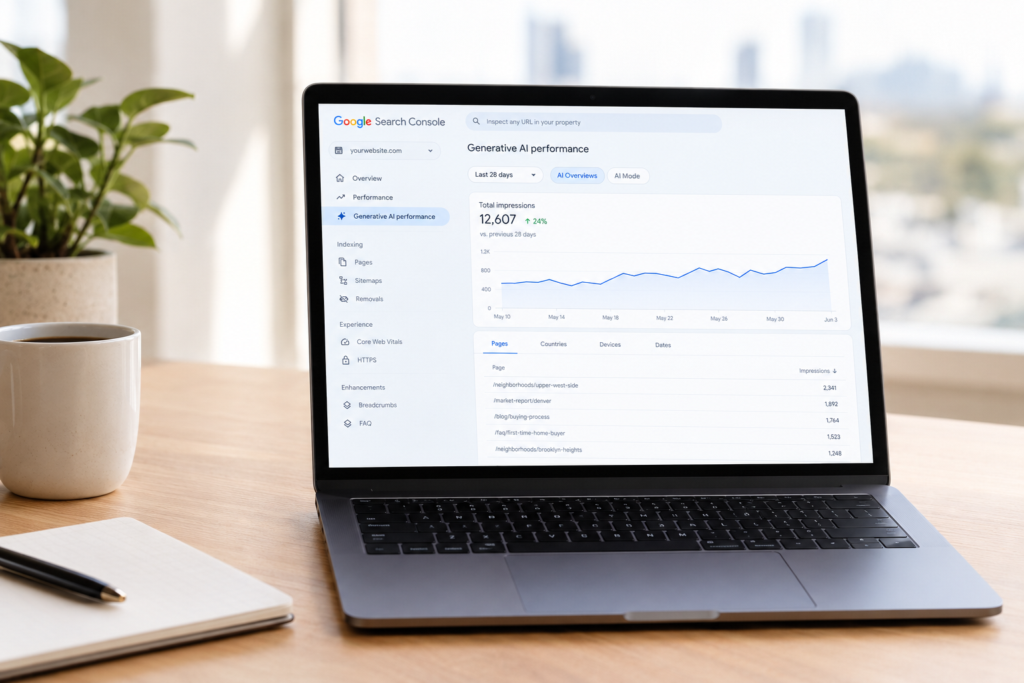
On June 3, Google turned on a new report inside Search Console that answers a question real estate agents have been asking me for a year. Does my content show up when someone asks Google's AI a question? Luxury Presence's SEO team works with more than 87,000 agents. I checked some of our client accounts shortly after launch, and the report was already turned on for every one. Here's what the report is, what it tells you, and where to find it.
What is Search Console's new generative AI report?
It's a dedicated view inside the Performance section of Search Console, built only for Google's AI surfaces: AI Overviews and AI Mode. Until now, the honest answer to "are we showing up in AI results" was "probably, but we can't prove it." This report replaces the guess with Google's own count.
What does the report show?
The report boils down to one number, impressions, and lets you slice that number four different ways.
Four ways to look at the data
An impression means a link to your site appeared somewhere inside an AI Overview or an AI Mode answer, whether or not anyone clicked it. You can break that number down by:
- Pages. Which specific URLs on your site are showing up inside AI answers, so you know exactly which content is getting used.
- Countries. Which country the person searching was in when your content appeared.
- Devices. Whether the impression happened on a phone, tablet, or computer.
- Dates. Which day it happened, so you can see whether your visibility is climbing or falling over time.
What's new here, and what isn't
The data comes from the same web search traffic Search Console was already counting in your main Performance report, so your total impression count won't go up because of this report. What changes is visibility into that traffic.
Google now tells you which of those impressions came specifically from AI Overviews and AI Mode, instead of folding them into everything else. I've written before about how a growing share of searches never end in a click at all, and this report is the first time Google has let us see where some of that invisible activity is landing.
One thing that is genuinely excluded: results from Google Search Labs, Google's opt-in program for testing early, unfinished search features. If you've ever opted into an experimental AI feature you saw in your own search results, that activity doesn't count toward this report.
How this compares to the AI Overview clicks you might already see
This new report only shows impressions, never clicks.
But some Search Console accounts already have a separate, older way to see AI Overview clicks. Inside the regular Performance report, there's a "search appearance" filter for AI Overviews, sitting alongside filters like images or videos.
Google hasn't rolled that filter out to every property. If you don't see it, there's a workaround: open your Queries tab and look for terms where you're ranking near position one but your click-through rate has quietly dropped. That drop is often a sign the AI Overview is answering the question itself, without sending anyone to your site.
Either way, that's click data, and it lives in a different report than the new impressions view this article is about. The two don't share a common ID, so you can't line up one specific AI Overview click with one specific AI impression.
Think of them as two separate signals. The new report tells you which pages are getting pulled into AI answers. The AI Overview clicks, or the click-through-rate drop if you don't have the filter, tell you whether those appearances are still sending anyone to your site.
Where do you find it?
Open Search Console and look in the left-hand menu under Performance. The new report sits there as its own item, separate from your standard performance report, scoped only to AI Overviews and AI Mode traffic.
What can you do with this data?
Here's how my team is already putting it to work.
Find your content gaps
Compare the Pages tab in this report against your regular Performance report. A page with strong web impressions but zero AI impressions points to a gap worth investigating. A page pulling AI impressions without a strong organic ranking is worth protecting, because it's earning attention your ranking position alone wouldn't tell you about.
Double down on what's already working
Look at which content types show up most often in the Pages tab. Neighborhood guides, market reports, and FAQ-style pages tend to get cited. Once you know what's landing, build more of it.
Use it to find the questions you should be answering
My colleague Thomas Gregorich, who leads SEO for Luxury Presence's corporate site, points out that this report can't show you the actual question someone typed or asked. But your regular Performance report can get you close. "You go into Google Search Console, and if you look at long-tail keywords that have high impressions but not a lot of clicks, those might be the kind of things people are searching for in AI tools," he says.
In practice, that means pulling up your Queries tab, sorting for long, specific phrases that show a lot of impressions and few clicks, and treating those as a shortlist of questions worth answering directly on your site, in a new page or an existing one.
Compare notes across AI platforms
Google Analytics has its own way of catching AI traffic. GA4 now automatically tags visits from major AI chatbots like ChatGPT, Gemini, and Claude into their own channel. It only catches an actual click-through, so it can't tell you when your content was cited but nobody clicked, and coverage of platforms like Perplexity is still inconsistent.
Even with those gaps, if you're seeing GA4 sessions from that AI channel landing on the same pages showing up in your new Search Console report, that's a real signal your content is earning attention on other AI platforms too, beyond Google.
What are its limits?
Before you build a whole strategy on this report, know where it runs out:
- Impressions only. There's no click, click-through rate, or position data inside this report.
- No queries. You can see that a page appeared. You can't see what someone typed or asked to make it appear.
- No automation. Search Console's API and its bulk data export to BigQuery still only cover six categories: web, image, video, news, Google News, and Discover. Neither one includes AI Overviews or AI Mode, and Google hasn't said that's changing. If you want this report's own numbers anywhere outside the Search Console screen itself, exporting them by hand as a CSV is currently the only way.
- Limited history. Data starts around mid-May 2026, so year-over-year comparisons won't be possible until 2027.
- Google only. The report has nothing to say about ChatGPT, Perplexity, Claude, or any other model, only what Google itself shows in AI Overviews and AI Mode.
- Still a limited rollout. It's been live on every client account I've personally checked, but Google hasn't said it's available on every property yet.
Why does this matter for real estate specifically?
Real estate questions are exactly the kind that trigger an AI answer: best neighborhoods in a city, whether now is a good time to sell, how the buying process works. Agents have been asking whether their content gets used in those answers.
Now there's a page-by-page way to check, and a reason to keep investing in the kind of content AI cites, like neighborhood guides, market reports, and FAQ pages.
I go deeper on the broader shift behind this in the questions I keep getting asked about Google's AI search changes.
What should you change because of it?
Here's where I'd start.
Write for the passage, not the page
AI search rewards specific passages that answer a question clearly, more than it rewards a whole page being generally relevant. The unit of optimization has shifted. It used to be "rank this page." Now it's "make this specific claim extractable, attributable, and authoritative" when you're writing it. In practice, that means structuring headers as the questions a client would ask, and answering them in the sentence right after.
Put a real name behind the answer
Here's the practical version: write down the one detail only you would know, not the one any agent could write. A market report built from public data reads like every other market report. Your actual read on the block that's quieter than the listing photos suggest, or the park two streets over that never makes it into the brochure, is different. That's the kind of detail an AI model has no other source for, which is exactly why it gets cited.
Don't chase the label
Thomas and I both push back on treating Answer Engine Optimization (AEO) and Generative Engine Optimization (GEO) as separate disciplines from SEO. If I'm being honest, I don't think you need a separate playbook called GEO at all.
SEO has turned into search everywhere, across Google, AI platforms, and social. Thomas puts it well: since getting sourced in an AI answer requires the same underlying authority as ranking in classic search, AEO and GEO "seem too connected and similar to be distinguished with these different names."
Good, authoritative content that shows your real experience and your unique value is still what wins, and we have the results to back that up. I go further into where AEO, GEO, and SEO overlap in this breakdown, including why we found that most AI brand mentions come from sites you don't own.
Open your own Pages tab this week. If a neighborhood guide or market report is already earning AI impressions, keep it current, keep it specific to your market, and put your name on the answer.
Ready to grow?
Turn your content into your best lead source
See how Luxury Presence helps agents turn website visits into closed deals