
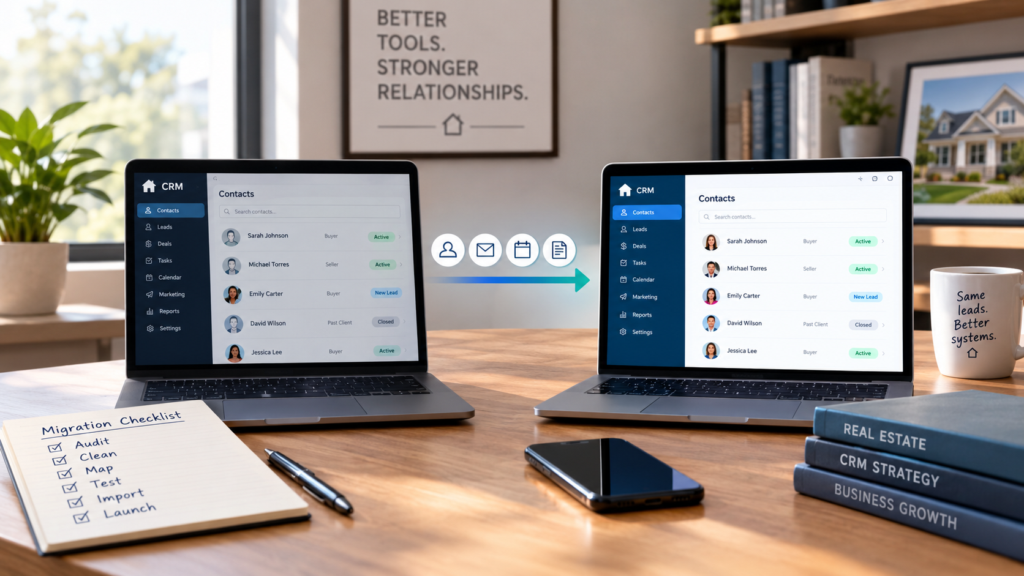
You built that database one contact at a time. Thousands of names, years of notes, active leads mixed in with past clients, saved searches, and automations that fire without you thinking about them twice. The CRM itself has become the problem, and moving all of it feels riskier than living with a tool you've outgrown. You're wondering how to switch real estate CRMs without losing leads.
A CRM migration is a business process migration. A CSV carries names, emails, and phone numbers. The automations, the templates, and the habits your team runs on every day only move if someone rebuilds them on the new side.
Ben Belack has lived this. He left CRM Interactive for Follow Up Boss after years of pushing a provider that wouldn't update his outdated website, a move that eventually brought him to Luxury Presence, which integrates with Follow Up Boss directly. His verdict on why the fight was worth it: "The money's in the CRM... the sooner you really focus on owning the CRM, the sooner you'll make money, even if you're a great prospector, because most people aren't going to transact today, so that CRM is so integral."
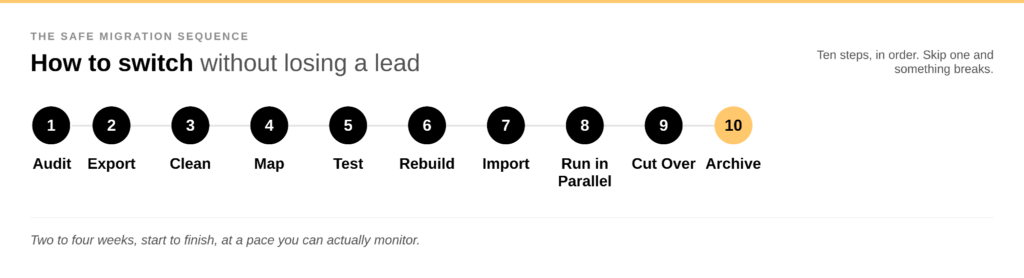
This guide walks through the sequence that keeps a switch safe for your leads, your pipeline, and your team's follow-up: audit, export, clean, map, test, rebuild, import, run in parallel, cut over, and archive.
Quick answer: how long does a CRM migration take?
Plan on two to four weeks for a careful migration. The timeline depends on database size, integrations, and how much automation needs rebuilding.
First, confirm a new CRM actually solves the problem
nurtureBEAST makes the sharpest observation on this question: some agents switch CRMs every 18 months, chasing a software fix for what is really a habits problem. Before you commit to a migration, ask a few honest questions:
- Is the current CRM genuinely missing capabilities the business needs?
- Do leads get lost inside the system, or do they get lost because follow-up isn't happening?
- Are the automations unreliable, or simply unused?
- Does the team log in and work from it every day?
Jonathan Spears, who scaled Spears Group past two and a half billion dollars in sales, ties growth directly to this question: "Five years ago I believed growth came with more human capital. Today I believe growth comes with great systems paired with great technology." He points to one specific habit as the real signal: agents who "track their business in Google Drive" while a perfectly good CRM sits idle. That's a habits problem, and no new platform fixes it on its own.
Maria Coukoulis, Spears Group's COO, makes the budget case for fixing the habit before shopping for new software: "You don't need to throw money at problems, you just need to be efficient and figure out how you can operate with what you have... at a very minimum, get that CRM organized and in place." Her framing principle is worth keeping in view through the entire process: agents are "investing in a place to put the process, not a name brand for the sake of investing in a name brand."
If the answers point to a genuine capability gap, build a short must-fix list before you shop for a replacement. Narrowing the field usually means weighing a handful of platforms against that list, whether that's the best real estate CRM software on the market right now or a head-to-head like Follow Up Boss vs. Wise Agent vs. Luxury Presence.
| Problem Today | What the New CRM Must Do |
|---|---|
| Leads disappear into the database | Surface next actions automatically |
| The team can't agree on pipeline stages | Standardize stages across every user |
| Follow-up relies on memory | Create task and automation triggers |
| Duplicate contacts pile up | Support real deduplication |
| Lead source data is a guess | Preserve and standardize source fields |
When Michele Harrington, Anna Bennett, and Lauren Henss standardized First Team's tech stack across a large brokerage, they built the must-fix list from what agents already trusted: "Our top teams and our top agents were all using Luxury Presence, Follow Up Boss, RealScout. And I said, why are we on a different system? Why don't we listen to our agents and implement what they determine is the best in class."
The real estate CRM migration checklist
Fourteen steps, in order, cover the whole move:
- Audit the current CRM
- Decide what moves, archives, or gets deleted
- Export the data
- Clean it
- Map every field
- Build the new CRM's structure
- Rebuild automations, templates, and tasks
- Test with 50 to 100 contacts
- Import in dependency order
- Validate the results
- Run both systems in parallel
- Cut over during a quiet period
- Keep the old CRM read-only
- Watch the new CRM closely for 30 days
Step 1: audit your database before you export anything
Skip the temptation to click Export All. An audit first tells you what's actually in the system and what's worth carrying forward.
Sort your data into categories before you export a single row:
- Contacts: name, email, phone, mailing address, birthday, anniversary
- Lead information: source, buyer or seller, budget, timeline, search criteria
- Relationship information: past client, sphere, referral source, VIP
- Pipeline data: stage, assigned agent, expected close date
- History: notes, calls, emails, tasks
- System information: tags, custom fields, automations, templates, saved searches, integrations
Luxury Presence CEO Malte Kramer frames this audit as the difference between an average database and a genuine asset: "Most of us know that we're sitting on a gold mine, we just don't have the picks and shovels to get to it... we have to build better systems that allow us to capture not just a phone number and an email, but all of the context about the relationship." He put it even more directly at SIGNAL 2026: "Think of your database not as a list of contacts, but a list of unfinished conversations."
From the audit, sort records into three buckets. Move active pipeline, current leads, important relationships, and roughly the last 12 to 24 months of meaningful activity. Archive older contacts and history worth keeping but not actively working. Skip duplicates, spam, test records, and anything with no usable information. What survives that cut is the most important asset you'll carry into the new system, so the extra care during this step pays off long after the migration is done.
Step 2: decide what moves, what gets archived, and what stays put
"Move everything" is the single most expensive decision in a CRM migration. It drags years of cruft into a system you're trying to keep clean.
- Move: current leads, active clients, transactions in progress, recent prospects, past clients, sphere and referral relationships, and the notes and lead source data attached to them
- Archive: cold leads, dead opportunities, duplicate contacts, and outdated test records, kept separate from the live CRM
- Never delete: transaction records, compliance documentation, and anything your brokerage, MLS, or state retention rules require
An archive only earns its keep if it stays organized enough to actually search when you need something out of it, not just a dumping ground for whatever didn't make the cut.
Step 3: export the old CRM the right way
Treat the first export as a master backup and leave it untouched. Build a simple folder structure to keep the trail clean:
- 01 Original Export (the untouched backup)
- 02 Cleaned Data (after deduplication and standardization)
- 03 Import Files (formatted for the new CRM)
- 04 Validation (spot-check results)
Export by category when the platform allows it, contacts, deals, notes, tasks, tags, and custom fields as their own separate files for far easier cleanup. Exact export options vary by CRM, so check the old platform's documentation before assuming a format.
Step 4: clean the data before it touches the new system
Merge duplicates first, matching on email, phone, name and address combinations, and near-identical name variations. Then standardize values that look identical to a person but read as separate segments to a system: "Buyer," "buyer," and "BUYER" often land in three different buckets. The same goes for phone number formatting, state abbreviations, and lead source labels. Years of manual entry usually produce a dozen versions of "Zillow" that should collapse into one.
Prioritize the fields the new CRM will actually use: email, phone, lead source, stage, assigned agent, buyer or seller status, and last contact date. A perfectly polished record from 2019 that nobody has touched since matters far less than a clean, current lead.
Step 5: map every field before you import
Build a field-mapping spreadsheet before the import, not during it:
| Old CRM Field | New CRM Field | Data Type | Required? | Transformation |
|---|---|---|---|---|
| Lead Source | Source | Dropdown | Yes | Standardize values |
| Contact Type | Contact Type | Dropdown | Yes | Map buyer/seller |
| Last Contact | Last Contacted | Date | No | Convert format |
| Lead Notes | Notes | Text | No | Preserve as-is |
| Assigned Agent | Owner | User | Yes | Map users |
Watch for fields that share a name but carry a different meaning. "Status" might track lead temperature in one CRM and transaction stage in another, and treating them as equivalent creates a dangerous mismatch. For any field with no clean match, decide up front whether it becomes a custom field, gets combined with another field, converts to a tag, or moves into the archive and skips the live database entirely.
Step 6: build the new CRM's structure before the data arrives
Set up pipeline stages, tags, custom fields, lead source categories, and ownership rules in the new CRM before a single contact lands in it. A new platform's usefulness depends on this structure existing first.
Ben Belack's approach to pipeline stages shows why the structure needs real intention behind it: "For people that want to have mastery of their CRM, they have to have a very specific understanding of status definitions. If you don't know what your status definitions are, then people go to a status or a smart search, and that's where the leads go to die." His own definitions separate a "new" contact met in the last 30 days from an "active" one on a save search from a "prime" one ready to buy soon and pulled off automated nurture entirely.
Luxury Presence's own AI CRM was built to reduce the manual side of this structure. Kyle Scott described the shift: "This is the first CRM that actually does the work for you... it goes out to some of the third-party data sources we have, birth information, marriage information, LinkedIn, job changes, publicly available property information, net worth estimates, to make an estimate when someone in your network is perhaps ready to start thinking about buying or selling a home. And then it alerts you" with a message already drafted in the agent's own voice.
Step 7: rebuild automations, templates, and tasks by hand
Your automations most likely stay behind when you switch. A CSV carries data. The rules and triggers that acted on that data live in automations, built to be rebuilt by hand on the new side. Kee Technology notes that drip campaigns, email templates, and task triggers generally need to be rebuilt manually after a CRM switch, since they rarely survive a basic CSV transfer.
Inventory every automation before leaving the old CRM, then rebuild the highest-risk ones first, in this order:
- New lead response
- Active lead follow-up
- Appointment reminders
- Transaction workflows
- Long-term nurture
- Past-client campaigns
A migration is also the moment to retire automations that never worked and rebuild the rest as workflows that actually hold up under real use, not ones that technically fire and get ignored.
Jose Prats' team treats this rebuild as a chance to upgrade the automation while they're at it: "We're adding in the AI tool, so when a lead contacts us, it'll communicate with them, they'll be like, oh cool, what do you need, what are you looking for?" He pairs the automation with a clear quality standard: "You got to train your chats very well to speak like how you would speak, and always edit."
Step 8: test with 50 to 100 contacts before the real import
Kee Technology's recommended test batch size, 50 to 100 sample contacts, is small enough to check by hand and large enough to catch real problems. Build the test group deliberately: include a new lead, an active buyer, an active seller, a past client, a sphere contact, a record with custom fields, one with heavy notes, one with multiple tags, and one tied to an active deal.
Check every field on every test record manually, including tags, stage, owner, notes, source, and deal associations. Then trigger the automations on purpose. Confirm new leads route correctly, emails don't fire accidentally, tasks appear on schedule, stage changes behave, and integrations connect. This step surfaces the scary problems while they still touch 100 contacts, well before they can touch 10,000.
Step 9: import in dependency order
Importing everything at once invites broken associations. Most CRMs expect this order:
- Users and team members
- Contacts
- Leads and opportunities
- Deals and transactions
- Notes and activity history
- Tags and custom fields
- Associations
- Automations
The exact sequence depends on the new platform's data model, so treat this as a starting framework and confirm against the destination CRM's own documentation.
Step 10: validate before you trust the migration
An import that reports "successful" still needs a human check. Compare total counts for contacts, active leads, active deals, past clients, and pipeline by stage against the old system. Pull 25 to 50 records at random and compare them line by line. Then verify the contacts that matter most: active buyers and sellers, anyone under contract, upcoming appointments, hot leads, and VIP clients. These are the people a migration cannot afford to lose.
Step 11: run both CRMs in parallel for two to four weeks
The parallel period is where real problems surface: missing data, broken automations, incorrect assignments, and workflow gaps the test batch didn't catch. Set a firm freeze date on the old CRM, a validation window of two to four weeks, and a clear rule for where new information gets entered during that window. Skip that rule and the team ends up maintaining two half-updated databases at once.
Follow-up during this window is where the value of the whole exercise gets proven or lost. Ryan Coyne, Serhant's Chief Experience Officer, is skeptical of the stats CRM vendors use to sell the switch and points instead to the fundamentals: "Follow-up is the silver bullet... just do a good job with your follow-up, and make sure you're thinking of valuable things to say to your clients when you call them." Lauren Henss adds the mindset that makes it stick: "Play the long game. It's not going to convert right away."
Step 12: cut over during a quiet period
Choose a lower-volume stretch on the calendar, avoid the busiest closing week of the quarter, and confirm the team can monitor the new system closely for the first few days. Take a final backup of the old CRM at the moment of cutover, then move it into read-only mode if the platform supports it.
Step 13: keep the old CRM read-only
Hold onto the old account for historical records, missing notes, compliance needs, and troubleshooting. A reasonable default is 90 days or longer, adjusted for any contractual or retention requirements specific to the brokerage. Deleting the old system the week of cutover is how agents discover a missing field two days too late, with no way to retrieve it.
Step 14: watch the new CRM for the first 30 days
A migration keeps going well after contacts first appear in the new system. Check daily for the first week: new leads, routing, automations, task creation, email delivery, integrations, and duplicate creation. Over the full month, track response times, leads contacted, missed tasks, and adoption across the team. Keep a running list in the format problem, impact, owner, fix, tested, so issues get tracked and resolved in order. Once the dust settles, the same discipline is what lets a team move on to more advanced ways of running the CRM day to day.
What actually transfers when you switch CRMs
| Data or Process | Usually Transfers? | What to Expect |
|---|---|---|
| Contact information | Yes | Typically via CSV or API |
| Tags | Often | May need remapping |
| Custom fields | Often | Need to recreate or map |
| Lead stages | Often | Map carefully, names rarely match |
| Notes | Sometimes | Depends on the CRM pair |
| Deal records | Often | Associations may need rework |
| Email or text history | Depends | Check both platforms directly |
| Saved searches | Rarely direct | Usually rebuilt |
| Email templates | Rarely via CSV | Rebuild by hand |
| Automations | No, via basic CSV | Rebuild by hand |
| Task triggers | No, via basic CSV | Rebuild by hand |
| Integrations | No | Reconnect manually |
Migration capabilities vary between specific CRM pairs, so treat "usually" and "often" as a planning baseline, and confirm the details with both platforms before assuming.
CRM migration mistakes that cost agents leads
- Exporting everything without an audit. The mess moves with you and stays broken in the new system.
- Cleaning after the import. Duplicate records multiply in the new system before anyone catches them.
- Treating a CSV as a complete migration. Data and workflows are two different problems with two different fixes.
- Losing lead source data in the shuffle. That's the field that shows where the business actually comes from.
- Skipping notes and history. The new CRM knows who the person is and loses the context of what happened.
- Shutting off the old CRM immediately. A missing field two days later becomes unrecoverable.
- Migrating dead leads while active ones wait. Prioritize the contacts who can move the business now.
- Switching platforms without changing the workflow. New software running the same habits produces the same results.
A sample four-week migration timeline
| Timing | What Happens |
|---|---|
| Week 1 | Audit the database, decide what moves, export, create the backup |
| Week 1 to 2 | Deduplicate and clean the data |
| Week 2 | Map fields, build the new CRM's structure |
| Week 2 to 3 | Rebuild automations and templates |
| Week 3 | Test with 50 to 100 contacts, fix what breaks |
| Week 3 to 4 | Full import and validation |
| Week 4 | Run both systems in parallel |
| End of Week 4 | Final cutover |
| After cutover | Old CRM moves to read-only |
Treat this as a sample plan and adjust it to the actual size and setup of the database. A solo agent with 2,000 contacts moves faster than a 20-person team with integrated lead routing.
The final CRM migration checklist
Before migration
- Confirm the new CRM solves a real problem
- Audit the current database
- Identify the active pipeline
- Decide what migrates and what gets archived
- Export a full backup
- Inventory automations, integrations, and custom fields
During migration
- Deduplicate and standardize fields
- Map old fields to new fields
- Build the pipeline, tags, and segments
- Rebuild automations and templates
- Test with 50 to 100 contacts
- Import in dependency order
- Validate counts and spot-check records
Before cutover
- Run both systems in parallel
- Test lead routing, automations, and integrations
- Verify active pipeline and upcoming appointments
- Take a final backup
- Communicate the cutover date to the team
After cutover
- Set the old CRM to read-only
- Monitor new leads and automations daily
- Watch for duplicates
- Track and fix migration issues
- Document the new workflow
- Review adoption after 30 days
The question that actually matters after you switch
A successful migration shows up in three things: the team knows who needs attention today, leads stop falling through the cracks, and everyone knows what happens next.
Test any contact in the new system this way: if that person called today and said they were ready, would the CRM show you everything you need to help them right now? Migrating the data is the easier half of the job. Give the workflow, the automations, and the follow-up habits built on top of it the same two to four weeks of attention as the contacts themselves, and the new CRM earns its keep.
FAQs on how to switch real estate CRMs without losing leads
Ready to grow?
Turn your content into your best lead source
See how Luxury Presence helps agents turn website visits into closed deals