
A real estate CRM (customer relationship management system) is the operational backbone of every high-performing agent’s business. It is the single place where you organize every contact, track every interaction, and nurture every lead from first click to closing table. Yet most agents either never set one up properly or abandon it within weeks because they lack a clear system. That gap between owning a CRM and actually working it is where deals die. In 2026, the agents who treat their CRM as a daily operating system, not a digital Rolodex, are the ones closing more transactions and earning higher commissions. This guide walks you through exactly how to organize, track, and nurture your leads inside a CRM so nothing falls through the cracks and every relationship moves forward.
Find It Fast
Key takeaways
- Agents who consistently use a CRM earn a GCI that is 40% higher than those who do not, according to Luxury Presence data. The tool only works if you work it every single day.
- Organize leads by source, stage, readiness, and engagement level, then assign follow-up tasks and reminders so every contact gets the right message at the right time.
- Track every interaction (calls, emails, website visits, social media activity) in one place so you can read lead behavior and respond with precision instead of guesswork.
- Automate your follow-up sequences and drip campaigns to maintain consistent communication at scale, but always review messages before they go out to keep the human touch.
- Let the data guide your strategy: monitor open rates, conversion rates, and lead source performance to double down on what works and cut what does not.
Why agents need a real estate CRM in 2026
Luxury Presence data shows agents who use a CRM have a GCI that is 40% higher than those who do not. That number alone should settle any debate about whether a CRM is worth your time. But the reasons go deeper than revenue. Here are the specific ways a CRM pays for itself.
- Organized client data: A CRM centralizes contact details, property preferences, interaction history, and transaction documents in one searchable record. No more digging through email threads or sticky notes.
- Faster, more consistent communication: Automated email sequences, follow-up reminders, and scheduled check-ins keep you in front of every lead without relying on memory alone.
- Better service for your database: When you can pull up a full client profile in seconds, you respond with context instead of cold outreach. That builds trust.
- One place for every task: Managing leads, assigning follow-ups, and tracking transactions from a single dashboard eliminates the chaos of juggling spreadsheets, calendars, and sticky notes.
- Smarter lead prioritization: Research shows 47 to 59% of buyers choose the first agent who contacts them (BatchData, 2026). A CRM with lead scoring helps you identify who to call first so you are that agent.
- Clear performance tracking: Conversion rates, pipeline status, response times, and engagement metrics give you a scoreboard for your business. You cannot improve what you do not measure.
- Marketing automation that converts: Email drip campaigns improve conversion rates by 25%, and email marketing delivers an ROI of 3,600% (Digital Agency Network, 2026). A CRM lets you build, send, and measure those campaigns from one place.
- Room to grow: Whether you are a solo agent building your first database or a team leader managing 10 agents, a CRM scales with your business without forcing you to rebuild your systems.
- Compliance and documentation: A centralized repository for transaction records, communication logs, and contracts reduces the risk of errors, missed deadlines, and regulatory issues.
How to set up and use a CRM in real estate

Knowing why you need a CRM is step one. Knowing how to set it up and actually use it every day is where the real work begins. Follow these ten steps to go from zero to a fully operational CRM.
Step 1: Research and choose the right CRM for you
Not every CRM is built for real estate, and not every real estate CRM fits your business model. Start by identifying what you need: lead capture and automation, transaction management, team collaboration tools, or all three. Compare platforms based on ease of use, integration capabilities with your existing tools, mobile access, and pricing structure. Read reviews from other agents, request demos, and test the interface yourself before committing. The right CRM should feel intuitive from day one, not like a second job to learn.
Step 2: Customize settings and configuration
Configure your CRM to match how you work. Add custom fields for property details, lead sources, client timelines, and communication preferences. Set up automated workflows for common tasks like new-lead follow-up and post-showing check-ins. If you run a team, define user permissions so each agent sees the right data.
Step 3: Import contacts and data
Transfer your existing contact lists, leads, and client records into the CRM. Most platforms offer import tools for spreadsheets, email providers, and other software. Before you import, clean your data: remove duplicates, standardize phone number formats, and tag each contact with a source and status so segmentation works from day one.
Step 4: Integrate with other tools
Connect your CRM to the other platforms you use daily: your real estate website, email marketing software, transaction management system, lead generation platforms, social media accounts, and listing portals. Integration keeps data consistent across every tool and eliminates double entry.
“Luxury Presence provides a gorgeous and highly integrated (with my Compass CRM) website that is easy to update and has all the bells and whistles.”
— Carol Lee, Real Estate Agent
Carol’s experience highlights a principle that applies to every CRM setup: the fewer manual steps between your website and your database, the faster leads get into your pipeline and the less likely they are to slip away uncontacted.
Step 5: Train all users on the team
If you lead a team, schedule hands-on training sessions before expecting anyone to adopt the system. Cover the daily workflow: how to log a call, update a lead status, set a follow-up task, and run a report. A CRM only works when every person on the team uses it the same way, every day.
Step 6: Input new leads and contacts
Begin entering new leads as they come in through website inquiries, landing pages, open houses, referrals, and ad campaigns. Assign each lead to the right agent and trigger an automated follow-up task immediately. Speed to lead matters: the agent who responds first wins the appointment.
Step 7: Segment target audiences
Use your CRM’s segmentation tools to sort contacts into groups based on lead status, property type interest, geographic area, timeline, and engagement level. Then build targeted email campaigns, newsletters, and follow-up cadences for each segment. A first-time buyer in month one of their search needs a different message than a past client who closed with you two years ago.
Step 8: Track interactions and communication
Log every touchpoint: emails, phone calls, text messages, property showings, and meeting notes. Update lead statuses after each interaction and set the next follow-up task before you close the record. This habit takes 30 seconds per contact and prevents the “I forgot to call them back” problem that kills deals.
Step 9: Monitor performance and analytics
Review your CRM dashboard weekly. Track conversion rates by lead source, average response time, pipeline velocity, and ad performance. These numbers tell you where your business is strong and where it is leaking opportunities.
Step 10: Iterate based on what the data tells you
Your CRM strategy is not a set-it-once project. Every quarter, review your data and adjust. Test different follow-up strategies, experiment with new email content, and shift your ad budget toward the lead sources that actually convert. The agents who win long-term are the ones who treat their CRM as a living system, not a filing cabinet.
How to use a CRM to organize leads
Getting leads into your CRM is only half the job. How you organize them determines whether you can act on them quickly or waste time searching for the right contact at the wrong moment. Here is how to sort your database so every lead gets the right attention.
1. Categorize your leads with clear tags
Lead segmentation helps you understand each contact and match your approach to their situation. The categories you choose will depend on your business model and your CRM’s capabilities. Here are the most common and effective ways to tag leads:
- Lead source: Where did they come from? (Website form, open house, referral, paid ad, social media)
- Buyer vs. seller: Are they looking to purchase, list, or both?
- Stage in the sales funnel: New lead, contacted, appointment set, under contract, closed
- Readiness to act: Hot (ready now), warm (1 to 3 months), cold (6+ months or unknown)
- Property type interest: Single-family, condo, multi-family, luxury, investment
- Geographic area: Neighborhood, zip code, or market zone
- Engagement level: How often do they open emails, click links, or visit your site?
- Lead score: A numerical value based on likelihood to convert, budget, and timeline. Many CRMs assign this automatically through lead scoring capabilities that weigh dozens of behavioral signals.
The table below shows a sample lead pipeline you can replicate inside your CRM. Adjust the stages and tags to match your workflow.
| Pipeline stage | Definition | Recommended follow-up cadence | Example CRM tag |
| New lead | Just entered the database, no contact yet | Within 5 minutes of entry | New, Source: [channel] |
| Contacted | Initial outreach made, awaiting response | Every 2 days for the first week | Contacted, Hot/Warm/Cold |
| Engaged | Responded, actively communicating | Based on their timeline (daily to weekly) | Engaged, Buyer/Seller, Area |
| Appointment set | Showing, listing presentation, or consultation booked | Confirmation 24 hours before, follow-up within 1 hour after | Appointment, Property Type |
| Under contract | Offer accepted, in escrow | Weekly transaction updates | Under Contract, Close Date |
| Closed | Transaction complete | 30/60/90-day post-close check-ins, then quarterly | Past Client, Anniversary Date |
| Nurture (long-term) | Not ready now, but a future opportunity | Monthly value-add email or market update | Nurture, Estimated Timeline |
2. Set tasks and reminders for every lead
Use your CRM to schedule follow-up calls, emails, and meetings tied to each contact. Plan automated, long-term follow-up sequences and drip campaigns (a drip campaign is a series of pre-written emails sent on a timed schedule to keep you top of mind). Doing this from your CRM saves hours each week and makes sure no lead or task disappears into the void.
3. Manage team assignments and coordinate communication
If you are a broker or team leader, your CRM should let you assign leads to specific agents based on geography, expertise, or workload. This creates clear accountability: everyone knows who owns which relationship. If multiple team members have communicated with the same lead, the CRM’s interaction log prevents crossed wires and keeps messaging consistent.
How to use a CRM to track leads
Once your leads are entered and organized, the CRM becomes your intelligence system. It tracks every signal a lead sends, whether they know they are sending it or not, and gives you the data you need to act at the right moment.
1. Track every connection in one place
Your CRM should log every interaction with a lead from a single record. Here is what to track:
- Total interactions: Every phone call, video meeting, and in-person conversation gets logged with a date, duration, and summary of key discussion points. Most CRMs also let you upload and store documents or contracts tied to the lead.
- Emails: CRM systems often integrate directly with your email provider, automatically logging every message you exchange with a lead. This keeps your communication history complete and searchable.
- Calls: Some CRMs have built-in call logging where calls can be recorded, transcribed, and stored within the lead’s profile. Even without recording, you can manually log call duration and notes.
- Social media activity: Many CRM platforms integrate with Facebook, Instagram, and LinkedIn, letting you track interactions and see what content a lead engages with on social channels.
- Website activity: Advanced CRMs track which pages a lead visits on your site, which properties they view, and which forms they fill out. For example, a CRM can flag a lead who has viewed a specific listing three times or saved multiple property searches, signaling they are a high-intent prospect who needs immediate attention.
2. Read lead behavior to know what they need
All of that tracking data adds up to a behavioral profile that tells you more than any single conversation could. Pay attention to these signals:
- Content engagement: What kind of emails do they open? What links do they click? What time of day are they most active?
- Property preferences: If a lead repeatedly visits luxury condo listings in a specific neighborhood, that is a clear signal about what they want, even if they have not told you directly.
- Interest level: A lead who opens every email, clicks through to listings, and visits your website multiple times per week is highly engaged. Prioritize them.
- Buying or selling readiness: Leads requesting showings, asking about mortgage pre-approval, or inquiring about listing timelines are signaling they are close to a decision. Move them to the top of your call list.
3. Monitor lead progress through analytics
Your CRM’s reporting features should let you attribute leads to their original source, analyze conversion rates at each pipeline stage, and identify which channels produce your highest-value clients. Use this data to forecast future closings and plan where to invest your marketing budget. If a lead source converts at 2% and another converts at 12%, the math on where to spend your next dollar is simple.
4. How AI is changing CRM lead tracking in 2026
In 2026, the most effective real estate CRMs go beyond manual logging. AI-powered lead scoring analyzes hundreds of behavioral data points, from website visits to email engagement to search patterns, and assigns each lead a score that updates in real time. This means you no longer have to guess which leads are ready to act. The system surfaces them for you.
Luxury Presence’s CRM, for example, uses AI-drafted messages and Smart Tasks to help agents maintain a personal touch at scale. The system suggests follow-up messages based on lead behavior, but nothing sends without the agent’s review and approval. This keeps communication feeling human while saving hours of writing time each week.
How to use a CRM to nurture leads in 2026

Organizing and tracking are the foundation. Nurturing is where you turn data into relationships and relationships into closings. In 2026, the agents who win are the ones who combine automation with genuine, personal communication, and a CRM makes that possible at scale.
1. Use data to refine your lead nurturing strategy
Your CRM data shows you exactly what is working. If a specific email gets a 40% open rate with first-time buyers, create more content like it. If leads from a particular source convert at twice the rate of others, shift your budget toward that channel. Test the cadence and frequency of your messaging: some segments respond better to weekly updates, others to monthly market reports. Let the numbers make the decision for you.
This data should also shape your broader business strategy. When you can see that referral leads close at 3x the rate of cold online leads, you know exactly where to invest your time and energy.
2. Automate your follow-ups without losing the human touch
In 2026, relying on manual follow-up alone is a losing strategy. Automation lets you respond to new inquiries within minutes, send scheduled nurture sequences over weeks and months, and trigger specific messages based on lead actions (like viewing a listing page three times). The key is that every automated message should still sound like it came from you, not from a robot.
“The sooner you really focus on owning the CRM is the sooner you’ll make money. That’s where the fortune is: in the follow-up.”
— Ben Belack, Real Estate Agent
Ben’s point is worth repeating in different words: the CRM is not a filing cabinet. It is a revenue engine, but only if you build follow-up sequences that run consistently and speak to what each lead actually cares about. A three-email drip sequence for new buyer leads might look like this:
- Email 1 (Day 0): Welcome message with a brief introduction, a link to your buyer’s guide, and a question about their timeline and preferences.
- Email 2 (Day 3): A curated list of listings matching the preferences they shared (or, if they have not responded, a selection of popular listings in their target area).
- Email 3 (Day 7): A market update for their target neighborhood with a clear call to action to schedule a consultation call.
3. What CRM-supported lead nurturing looks like in practice
A top Chicago real estate professional partnered with Luxury Presence to build an automated lead nurture email strategy targeting buyer leads. The three-email sequence was designed in HubSpot and delivered the following results: Email 1 achieved a 31% open rate, Email 2 generated a 43% click-through rate, the campaign produced a 43% overall buyer engagement boost, and the entire sequence recorded zero unsubscribes (Source: Luxury Presence Case Study: Automated Lead Nurture Email Strategy, 2026).
Those numbers did not happen by accident. They came from a clear segmentation strategy, relevant content matched to buyer intent, and a CRM that tracked every open and click so the agent could follow up with the most engaged leads first.
4. Personalize communication at every stage
Generic mass emails get ignored. Personalized messages that reference a lead’s specific situation get responses. Use your CRM data to tailor every touchpoint: mention the neighborhood they have been searching, reference the open house they attended, or follow up on a question they asked during a showing. This level of specificity builds trust and positions you as the agent who actually pays attention.
Personalization also drives long-term loyalty. A past client who receives a home anniversary message, a local market update for their neighborhood, or a check-in six months after closing is far more likely to refer you to friends and family than one who never hears from you again.
CRM lead nurturing and Luxury Presence
Luxury Presence builds technology specifically for real estate professionals, including websites, marketing tools, and CRM. Our CRM is a relationship management system designed for agents who want to nurture leads and maintain client relationships with personalized, automated touchpoints, all while keeping full control over what gets sent. The platform tracks the entire client journey from first contact to closing and integrates with your Luxury Presence website and marketing efforts so every lead flows into your pipeline without manual data entry.
If you are ready to stop losing leads to disorganized follow-up and start running your business on a system that works as hard as you do, explore our CRM and see how it fits into your workflow.
FAQs
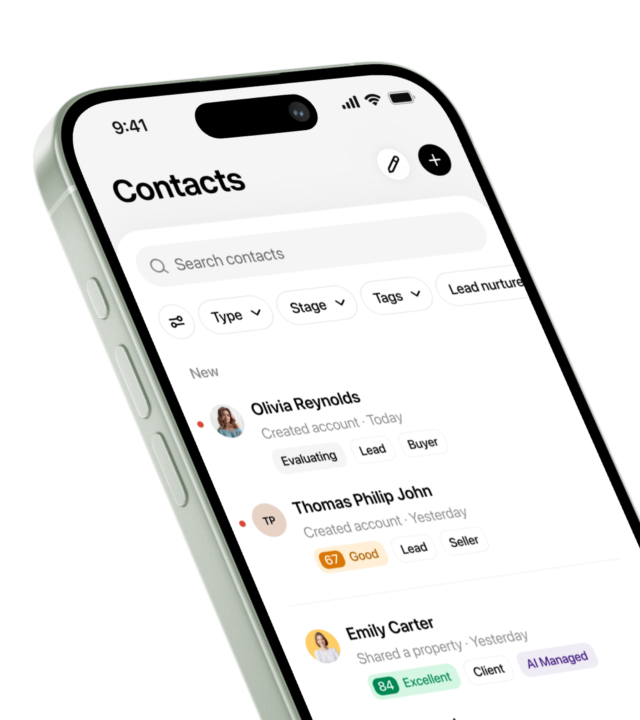
Introducing Presence® CRM
Activate your network’s full potential.
About the author

Marketing Manager
Kate Evans is a content marketing strategist at Luxury Presence, the leading growth platform for high-performing real estate professionals. She develops data-driven editorial content and supports SEO strategy and brand voice frameworks that help agents attract qualified leads and establish market authority. Her published work covers topics including CRM strategy, social media marketing, and digital growth, supporting thousands of agents in scaling their businesses through modern marketing.